One More Lawn Co-op Guide: 6 Players, One Lawn
How to start a six-player One More Lawn co-op session, share the code, split the work and keep a shared lawn from turning into a mower traffic jam.
One More Lawn supports up to six players online, each with their own mower, on the same lawn. You can invite through Steam or share a six-digit code, talk through proximity voice chat, and spend the whole job within a few metres of five people who are all trying to turn left at the same time.
Co-op is the best way to play the big jobs and the fastest way to ruin a stripe pattern. This guide covers the lobby, the roles and the etiquette.
How to start a session
- From the title screen, choose Play with Friends.
- The host opens a lobby.
- Invite friends through Steam, or read out the six-digit code.
- Everyone picks a mower and spawns on the lawn.
- Set the job, the deck height and the stripe direction before anyone starts cutting.
The code is the fastest route for friends on different Steam regions. The host should read it slowly; six digits is short enough to mistype twice.
The demo only supports co-op between demo players. If a friend owns the full game and you are on the demo, you cannot share a lawn until you are on the same version.
Lobby settings that matter
- Family Friendly mode is per player. Each person can set it independently in Options > General, and it can be toggled mid-session.
- Streamer Mode hides the lobby code on screen. Since 0.9.19 it is the setting to use if you are broadcasting.
- Controls are per player. One person can use a wheel, another a controller, another mouse and keyboard.
- HUD visibility can be hidden since 0.9.22. If someone is recording, let them hide it.
The settings guide→ covers the full options menu.
The role split
Six mowers on a small lawn is a traffic jam. Six players with roles is a crew.
The lane mowers (2–3)
They own the long straight passes. Same direction, same overlap, no crossing. On Elvira's backyard, two is enough; on the golf course or the island, three.
The trimmer (1)
Edges, fences, lighthouse base, tent lines. The trimmer player is the reason the coverage line reaches 100%. They should work ahead of the mowers so the mowers never have to scrape a wall.
The detail player (1)
Moves gnomes and props, checks the bag, watches the care line. On the island, this player owns the wedding area.
The runner (1)
Fuel, bag dumps and Chiquito trips. A full bag is a silent coverage penalty, and a dry tank is a comedy scene.
The host
The host sets the job and the deck height and keeps the group on the same number. The host is not automatically the best mower; they are the person with the lobby.
The pre-job checklist
Read this out loud before the blades drop:
- Job: which lawn.
- Height: the exact deck number.
- Direction: the stripe baseline.
- Lanes: who owns which strip.
- Edges: who has the trimmer.
- Props: who moves the gnome.
- Bag: who runs the dumps.
It takes thirty seconds and saves the receipt.
Co-op etiquette
- Do not drift through someone's lane. The collision is harmless; the bald patch is not.
- Do not turn on uncut grass. It is the most common co-op care penalty.
- Do not kick the gnome. It stuns a player and damages the care line.
- Do not hog the trimmer. It is the least glamorous role and the most important.
- Do not buy the party speaker mid-job. Buy it after the receipt.
The game's player interactions are playful: wave, point, dance, throw fruit, punch for a stun. None of it does damage, but all of it can knock someone off a straight line.
Voice chat and pings
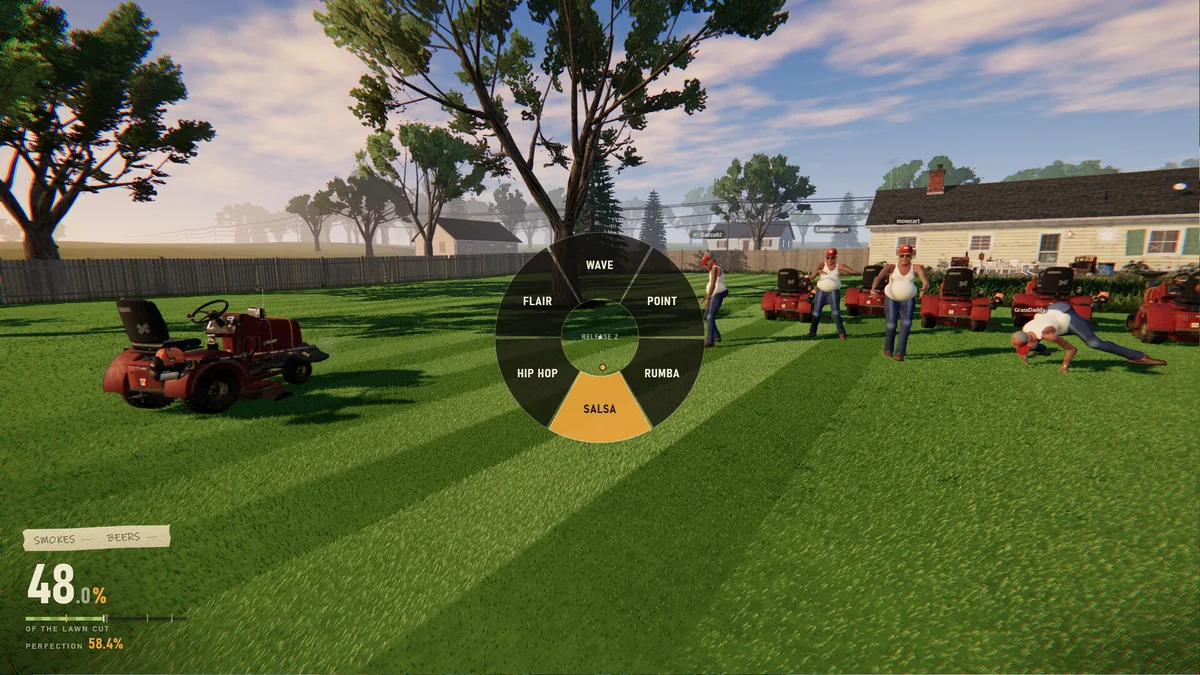
Proximity voice chat means you hear the people near you, not the whole lobby. That is great for immersion and terrible for coordination. Use the emote wheel for silent communication:
- Wave — hello or follow me.
- Point — look at this.
- Flair / Hip hop / Salsa / Rumba — celebration, or a distraction.
If voice is not working, agree on a simple rule: the host calls the height and the direction in text before the job.
What co-op changes
- Coverage gets easier with more players, but only if lanes are assigned.
- Height gets harder, because every mower has its own lever.
- Care gets harder, because six people can hit six different props.
- Fun gets much easier. The timelapse of six mowers is the point.
The perfect lawn scoring guide→ explains why care is the usual co-op failure.
Troubleshooting
- Friend cannot join: check that both players are on the demo or both on the full game.
- Code does not work: read it again; Streamer Mode may be hiding it on the host's screen.
- Someone is lagging: the host's connection is the lobby. A wired connection helps.
- Someone cannot see the HUD: check their HUD visibility setting.
- A player is stuck: they can get off the mower, walk, and get back on.
FAQ
How many players can play One More Lawn co-op?
Up to six, including the host.
Is there split-screen?
No. Co-op is online; each player needs their own copy and screen.
Can demo players join full-game lobbies?
No. The demo and the full game are separate lobbies.
Is there cross-play?
I have not found a confirmed cross-platform co-op feature. The store page lists online co-op, not cross-play.
Official source: One More Lawn on Steam ↗, the demo release notes ↗ and the 0.9.19 Streamer Mode notes ↗.